06.10.2026
How OpenUSD Became the Common Language of Digital Content
Understanding the open standard for 3D worlds — through a "home renovation" analogy
Opening: The BMW Factory That Was Never Built — Yet Has Run for Years
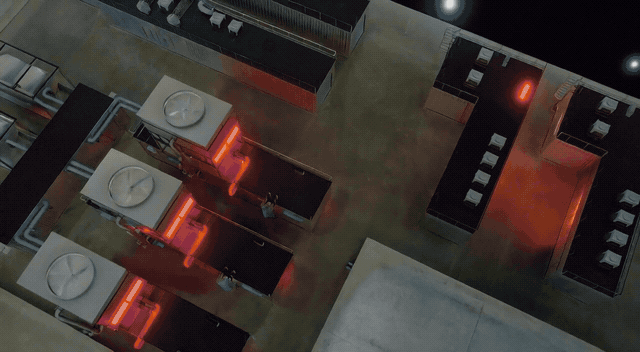
In 2025, BMW opened a new EV plant in Hungary. Long before the concrete was poured or the steel beams raised, every production line, every robotic arm, every logistics route in this factory had already been simulated and run in a virtual world for years. Architects, MEP engineers, and robotics engineers — scattered across dozens of time zones — were simultaneously editing and validating "the same virtual factory," with no need for emails confirming which version of the blueprint was current.
The key technology that lets everyone "edit the same factory at the same time without overwriting each other" is called OpenUSD.
This guide explains: what OpenUSD is, how it works, why it traveled from Pixar's animation studio to BMW's factories, Lowe's retail stores, and Apple Vision Pro — and what it means for your next product decision.
TL;DR
OpenUSD (Universal Scene Description) is an open-source 3D scene description standard. It lets Maya, Blender, Revit, CATIA, Unreal Engine, NVIDIA Omniverse, Apple Vision Pro and many other tools read the same 3D data, with multiple people editing non-destructively in parallel. The industry calls it "the HTML of 3D."
| If you are... | Why this guide is worth reading |
|---|---|
| PM / Product | Cross-tool integration is a real pain; OpenUSD is the off-the-shelf standard answer |
| Sales / BD | When customers ask "Can it integrate with Omniverse / Vision Pro?", the answer is USD |
| Designer | Layers and Variants cut your "please copy and make a red version" tickets in half |
| Engineer | The Schema / Composition / Hydra three-layer architecture is worth studying as a data model |
Key Milestones
| Year | Event |
|---|---|
| 1994 | Pixar's first-gen animation system Marionette (Toy Story) |
| 2012 | USD officially launched internally |
| 2016 | Open-sourced |
| 2023.08 | Pixar, Adobe, Apple, Autodesk, NVIDIA co-founded AOUSD |
| 2025.12 | AOUSD released Core Specification 1.0 (membership grew to 50+ companies) |
Part 1: Understanding OpenUSD Through "Home Renovation"
1.1 The Pain Point: How Do Four Blueprints Stack Together?
Picture renovating a new home: an architect draws the structural plan, an MEP engineer draws the wiring diagram, an interior designer creates a decor proposal, and you yourself list modification requests. Four independent blueprints — yet they must compose into one outcome: the home you'll live in.
The problems: If I change one blueprint, will it affect others? How do different tools interoperate? How do you handle multiple variants of the same object? What if the scene is too big to even open?
The collaboration pain points in a 3D scene are exactly the same as in renovating a house — just at a much larger scale. A BMW factory's digital twin contains hundreds of thousands of components and hundreds of engineers. OpenUSD is the collaboration mechanism that solves this: it defines how blueprints are written, how they stack, how conflicts get resolved, how a single object gets pulled in from an external asset library, and how to switch between multiple variants of the same object.
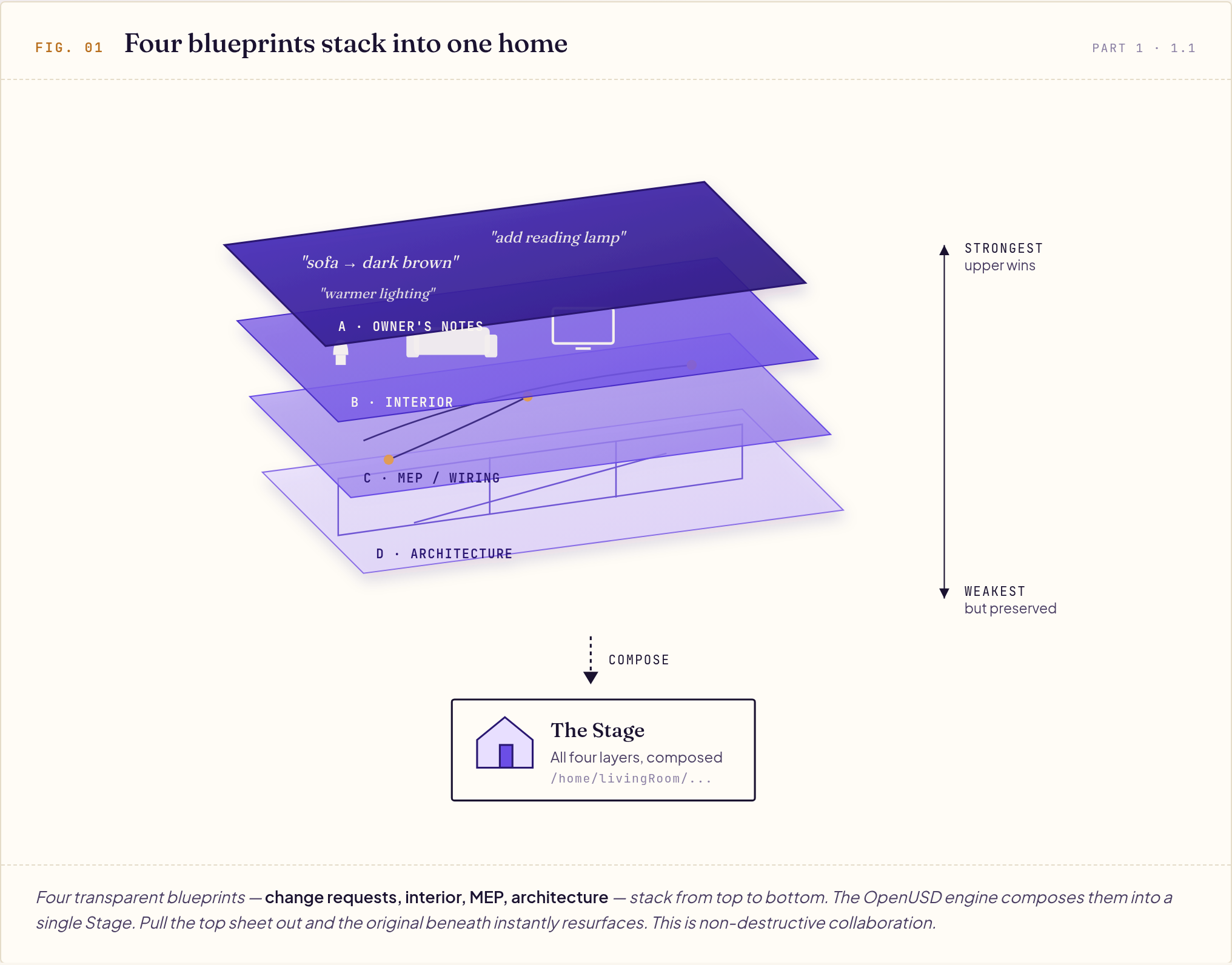
The four blueprints (Layers) above compose into the complete home (Stage) below. Layer A sits on top with the strongest authority; Layer D is the bottom layer.
Intuition: Your modifications won't break the architect's original file; when the architect updates, you see it immediately. People work on different Layers without interfering with each other — this is "non-destructive collaboration."
1.2 The OpenUSD Concept Map
| OpenUSD Term | Renovation Analogy | One-Sentence Explanation |
|---|---|---|
| Stage | The finished home you walk into | The composed result of all layers |
| Layer | One blueprint | A USD file, stackable and overridable |
| Prim | An object in the home (sofa, lamp, wall) | A unit node in the scene |
| Property | An object's spec fields | Attribute (value) + Relationship (pointer) |
| Path | The object's "home address" | /home/livingRoom/sofa |
| Reference | Ordering furniture from an IKEA catalog | Reference an external asset, no file copy |
| Payload | A "load on demand" wing of the house | Like Reference, but lazy-loaded |
| Variant Set | The same sofa available as "leather/fabric" | Multiple versions of the same object coexist |
| Specifier | Actually purchased / change request / design spec | def / over / class |
| Composition | Stacking all blueprints into "the final home" | The process of assembling Layers into a Stage |
| Hydra | Rendering the blueprint into a photorealistic image | Decoupling the scene from the renderer |
1.3 Five Concepts You Need to Know
① Layer + Composition: How Blueprints Stack
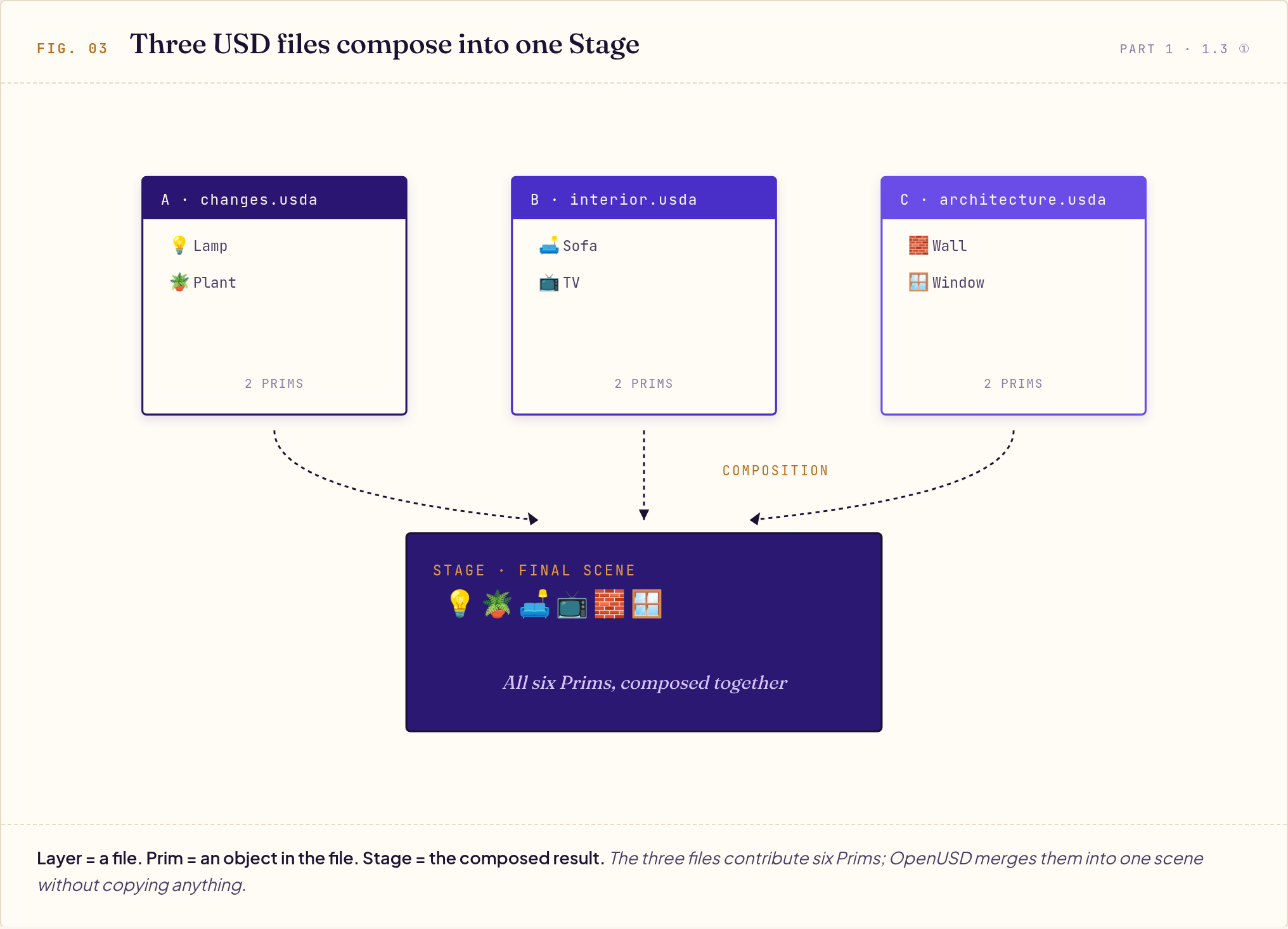
Each blueprint is a USD file (a Layer) containing some objects (Prims). Multiple blueprints stack from top to bottom, and the USD engine composes them into the final scene (the Stage) you see.
Here's what the three-layer concept looks like in practice — each Layer is a file that contains its own Prims, and all Layers compose into a final Stage:
In one sentence:
Layer= a file,Prim= an object inside the file,Stage= the composed result you see after all Layers stack.
Key trait: Upper layers override lower layers, but lower-layer originals are preserved. Remove the upper layer and the lower opinion automatically resurfaces — like a stack of transparent overlays where you can pull out any single sheet at any time.
A concrete example: the color of a living room sofa has been set to two different values by two layers —
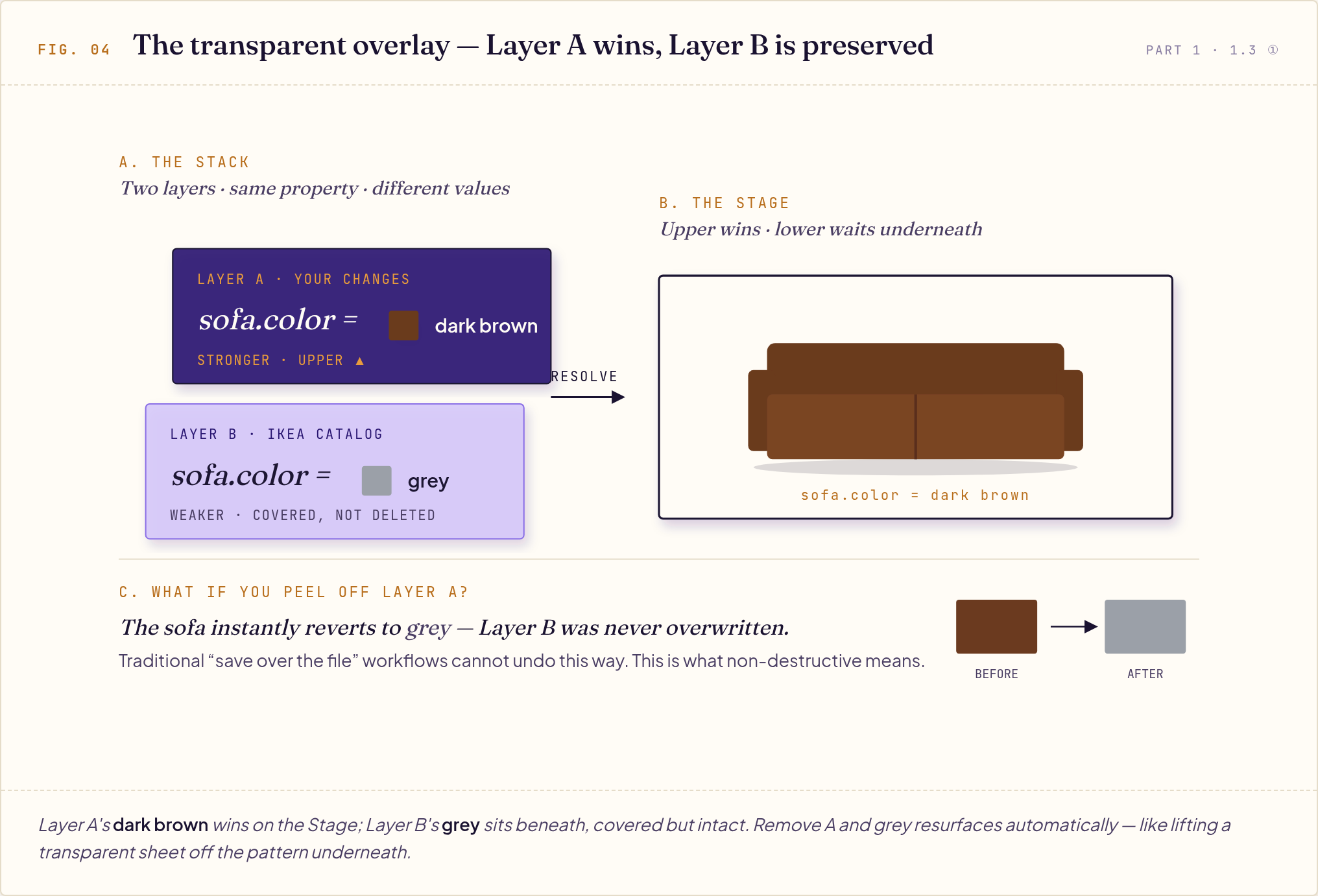
What happens if you remove Layer A? The sofa automatically reverts to grey — Layer B's value was never deleted, just covered. This is the real meaning of the "transparent overlay" metaphor: pull out any sheet, and the pattern beneath instantly reappears. Traditional "overwrite the file directly" workflows simply cannot do this.
⚠️ The Silent Landmine of Stacking: Mismatched Coordinates
The price of independent Layers: when the architect works in meters, the interior designer in centimeters, and the MEP contractor in inches — USD does not convert automatically. It just faithfully stacks the numbers. The result: a sofa shrunk to the size of a rice grain, furniture lying flat on a wall (wrong units and Y/Z up-axis confusion), or parts jittering at the far edge of the scene (float precision drift). What makes these errors scary is that they usually raise no warning at all — they wait silently until the composed Stage exposes them.
Prevention: lock metersPerUnit and upAxis at the pipeline entry point, and run usdchecker --strict on save or in your CI pipeline during development, so no Layer can quietly alter base metadata — and changes get tracked and verified.
② Reference vs Payload: IKEA Ordering vs Netflix Streaming
Two ways to reference external assets, differing in "when they load":
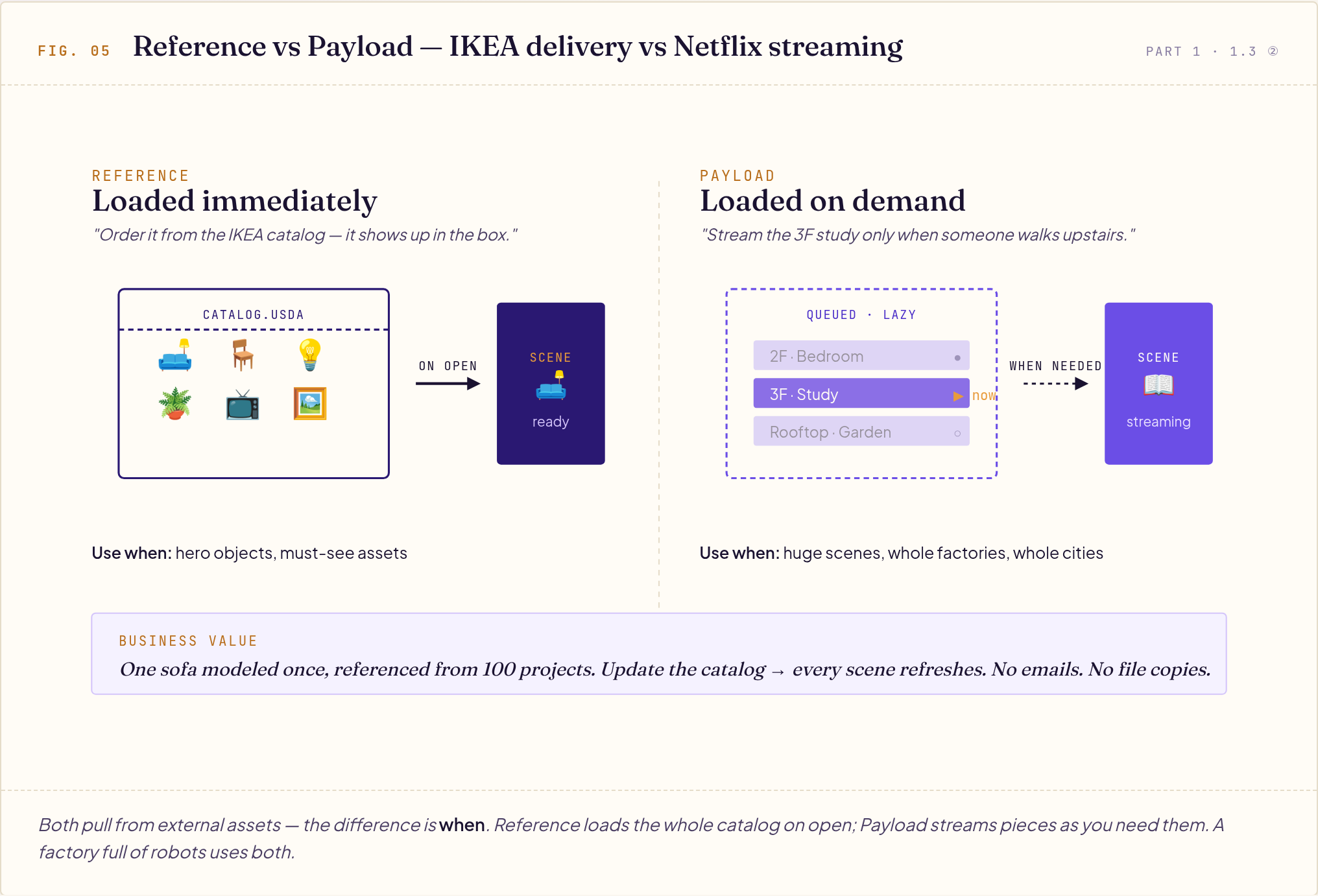
Bold solid arrow = loaded immediately (Reference); thin dashed arrow = lazy-loaded (Payload).
| Situation | Use Reference | Use Payload |
|---|---|---|
| Hero / must-see objects | ✓ | |
| Sections of a huge scene | ✓ | |
| Whole factories, whole cities | ✓ |
Business value: When IKEA updates a sofa design (updates the catalog file), all scenes that reference it update automatically — no need to notify anyone. The same sofa appears in 100 projects but only takes one slot on disk.
③ Variant Set: Multiple Versions of the Same Object
A common conversation in renovation: "Let's do two versions of this sofa, leather and fabric, so the client can choose."
The traditional approach is to copy the file and rename it. The USD approach is the Variant Set: one file, multiple versions built in, instant switching.
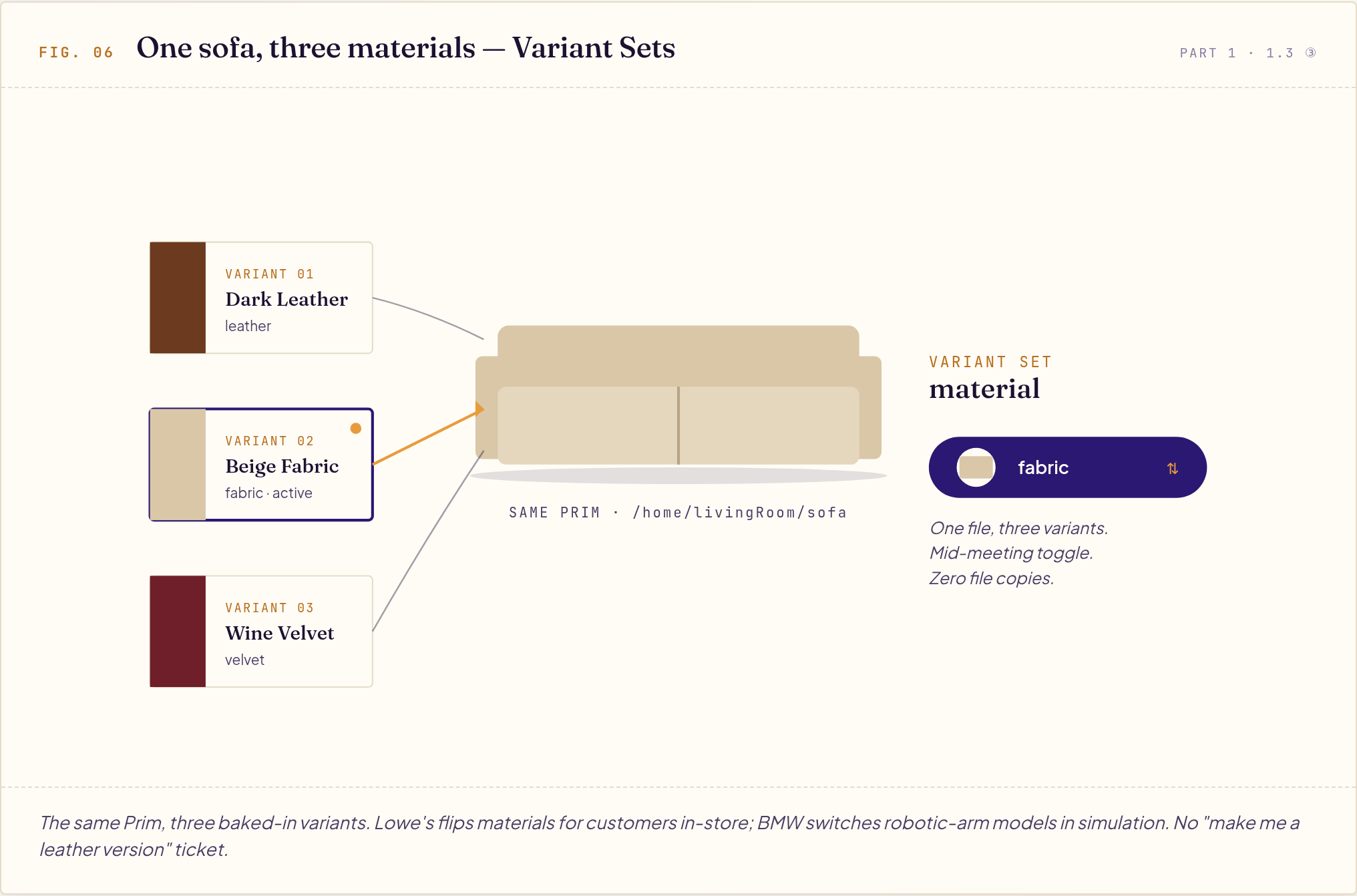
In manufacturing, BMW uses Variants to switch between different models of the same robotic arm; in retail, Lowe's uses Variants to display the same chair in different color schemes. Mid-meeting, "let's try the fabric version" — instant switch, no need to go back and copy a file.
④ def / over / class: Purchase, Change Request, Style Guide
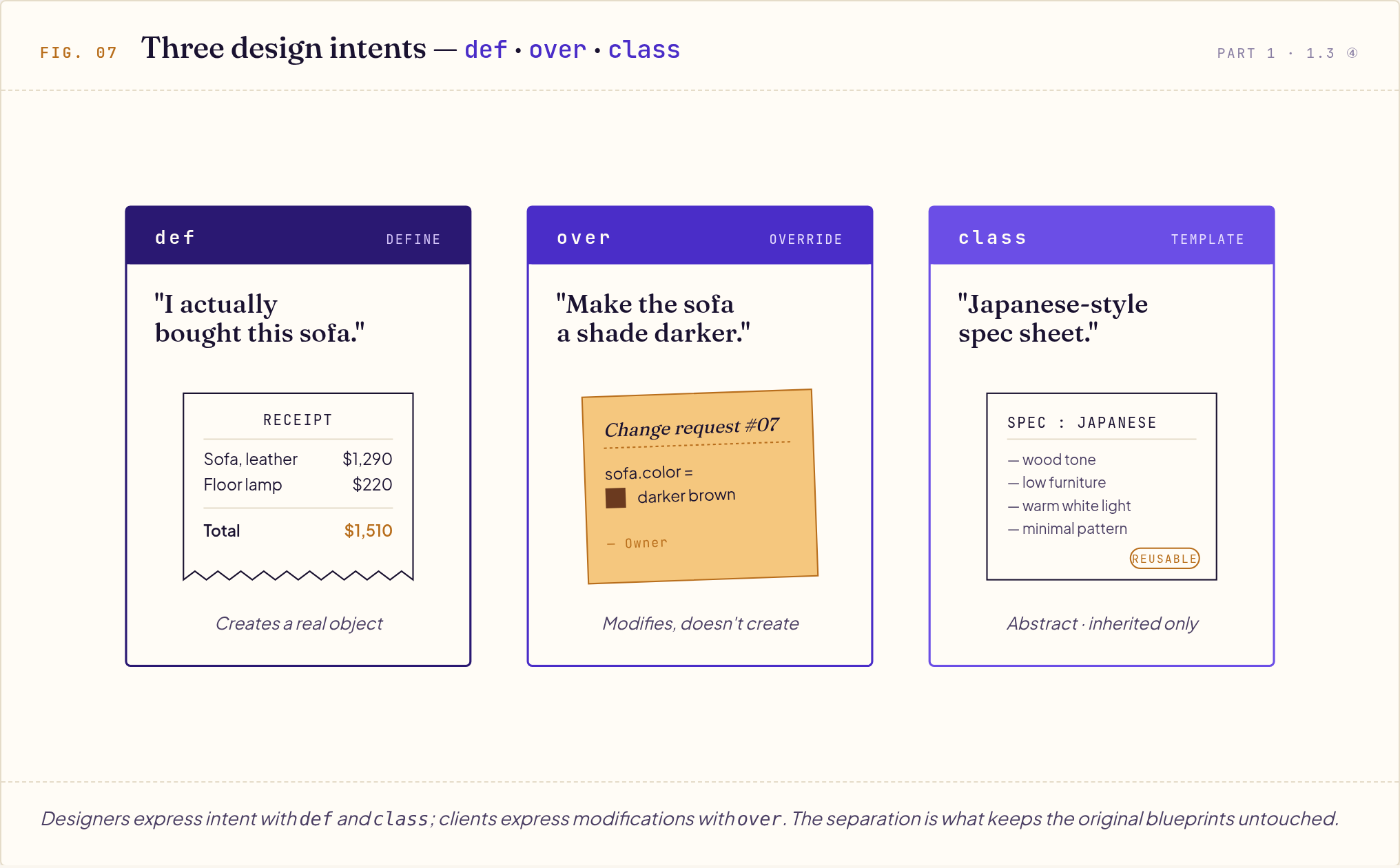
Three types of design intent in the renovation workflow:
| Spec Intent | Renovation Analogy | Behavior |
|---|---|---|
def | "I actually bought this sofa" | Truly creates an object |
over | "Change request: make it darker" | Doesn't create a new object, only overrides some properties |
class | "Japanese-style design specification" | Abstract template; doesn't render itself, exists to be inherited |
Why separate them? Because designers express intent (class, def) and clients express modifications (over). USD uses over to ensure the client's modifications don't overwrite the designer's original file — this is the essence of "non-destructive editing."
⑤ TimeCode: Properties Can Change Over Time
A morning living room is not the same as an evening one — sunlight angle, lighting, temperature all change. In USD, any property can "have different values at different points in time," which is called TimeSamples.
Example: sunlight intensity over a day
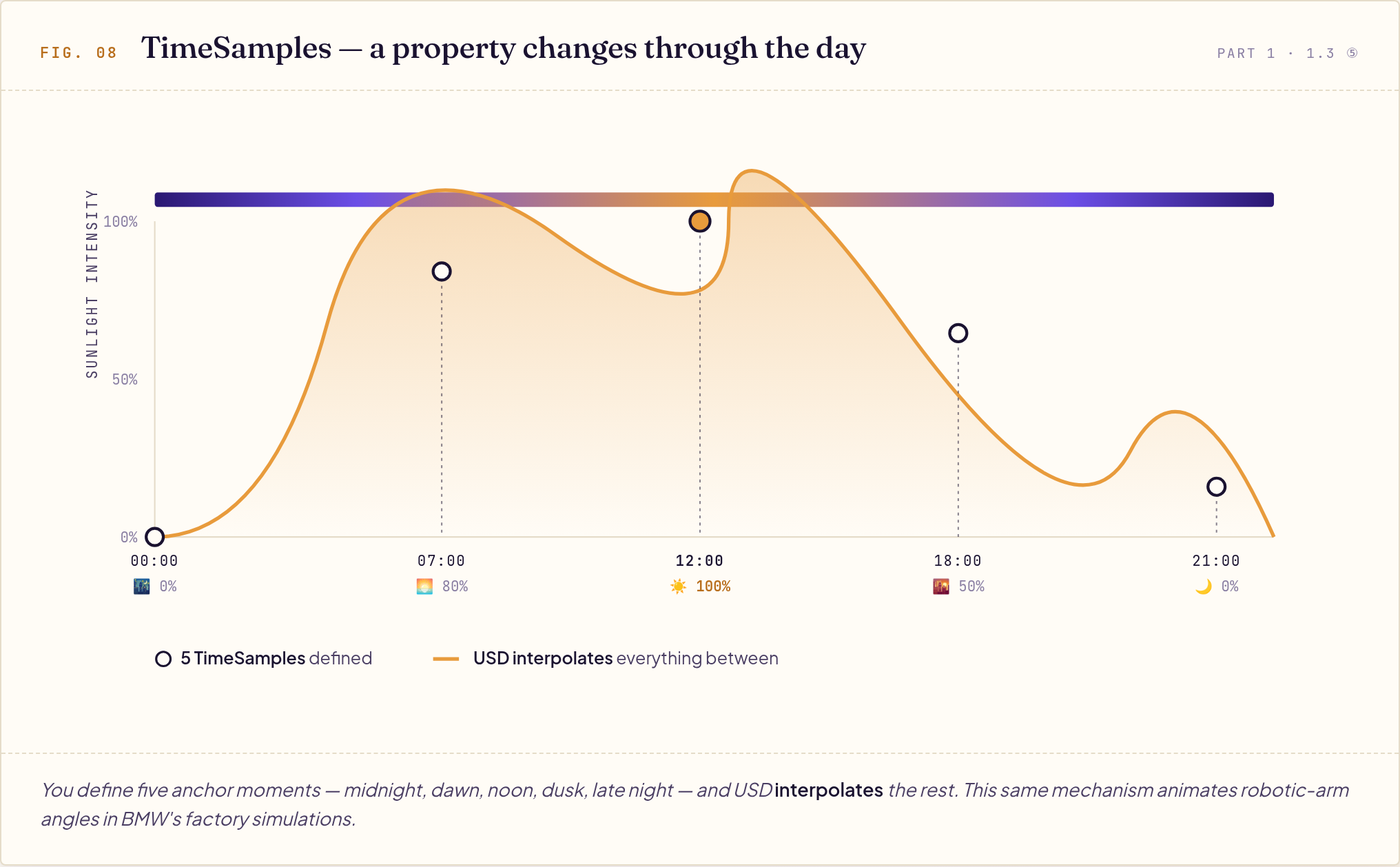
Key point: You only define 5 key time points (TimeSamples), and USD automatically interpolates between them — so the entire smooth transition from pre-dawn darkness to noon brightness is generated for you, without defining every second.
Any property can be animated this way: light intensity, furniture position, robotic arm angle, camera viewpoint. This is critical for industrial simulation, product demos, and interactive experiences — BMW's factory simulation uses this mechanism to make robotic arms move along realistic motion trajectories.
1.4 Why This Design Is Worth Learning
Combine the five concepts above and OpenUSD solves five problems of large-scale 3D collaboration:
- Multi-user without conflicts — Layer stacking, no destructive overwrites
- True asset reuse — Reference lets the IKEA sofa be modeled only once
- Easy variant switching — Variant Set lets clients compare options on the spot
- Open huge scenes — Payload defers loading
- Cross-tool interop — Schema is a public spec; what Maya writes, Blender reads
Part 2: Standard & Cases
2.1 OpenUSD and AOUSD: 30 Years of Evolution Toward an International Standard
OpenUSD is the crystallization of 30 years of internal animation pipeline evolution at Pixar, open-sourced in 2016. In 2023, five major vendors co-founded AOUSD to push it toward becoming an ISO international standard.
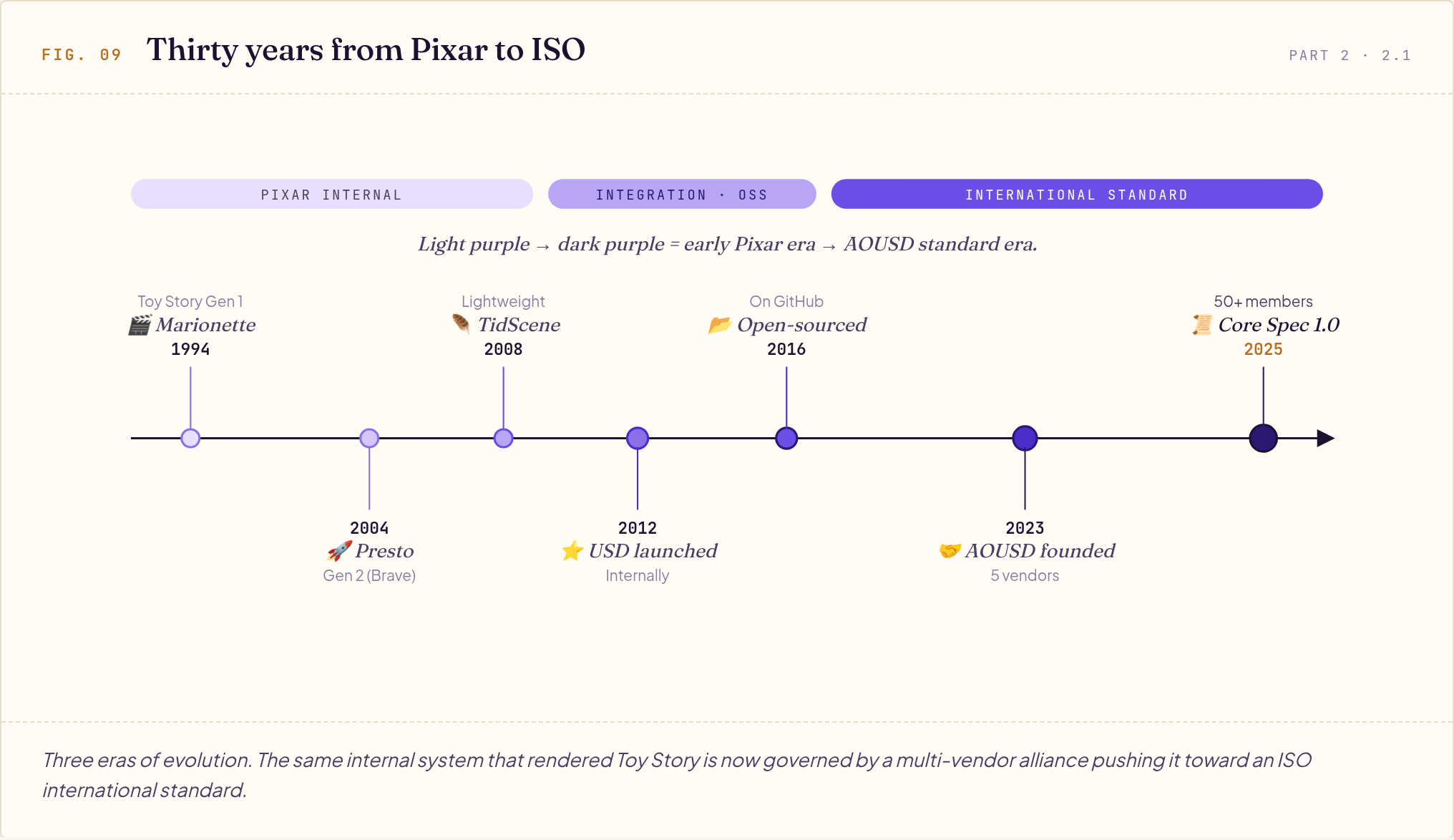
Color narrative: purple from light to dark = chronology from old to new. Light purple (1994-2008) is Pixar's internal era, mid purple (2012-2016) is integration and open-sourcing, dark purple (2023-2025) is the international standard era.
AOUSD founding members (Aug 2023): Pixar, Adobe, Apple, Autodesk, NVIDIA.
December 2025 milestone: Released OpenUSD Core Specification 1.0; membership expanded to 50+ companies, including Intel, Microsoft, Sony, Lowe's, Coca-Cola, Trimble, and Hexagon, spanning multiple industries.
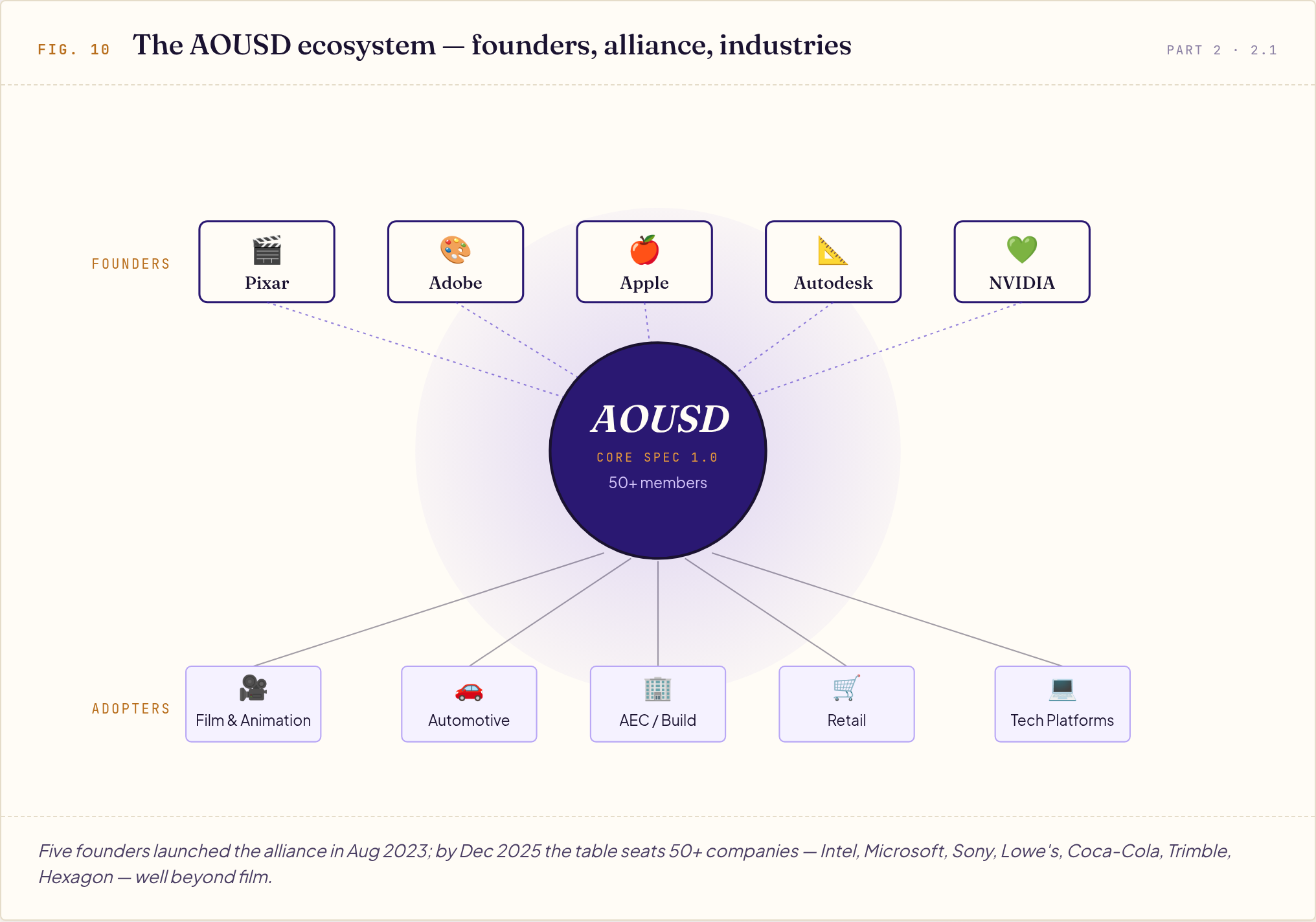
Top row = the 5 founding members (dark purple borders); bottom row = major adopting industries (light purple borders).
Three main file extensions:
| Extension | Type | When to use |
|---|---|---|
.usda | Plain text | Development, diff, version control |
.usdc | Binary | Delivery, large scenes (10-100× faster) |
.usdz | ZIP package | Consumer AR/VR (native to iOS, Vision Pro) |
2.2 LIVERPS: Whose Opinion Wins?
When different Layers write different values for the same property, USD uses the LIVERPS order to decide who wins. The order reflects strength — leftmost is strongest:
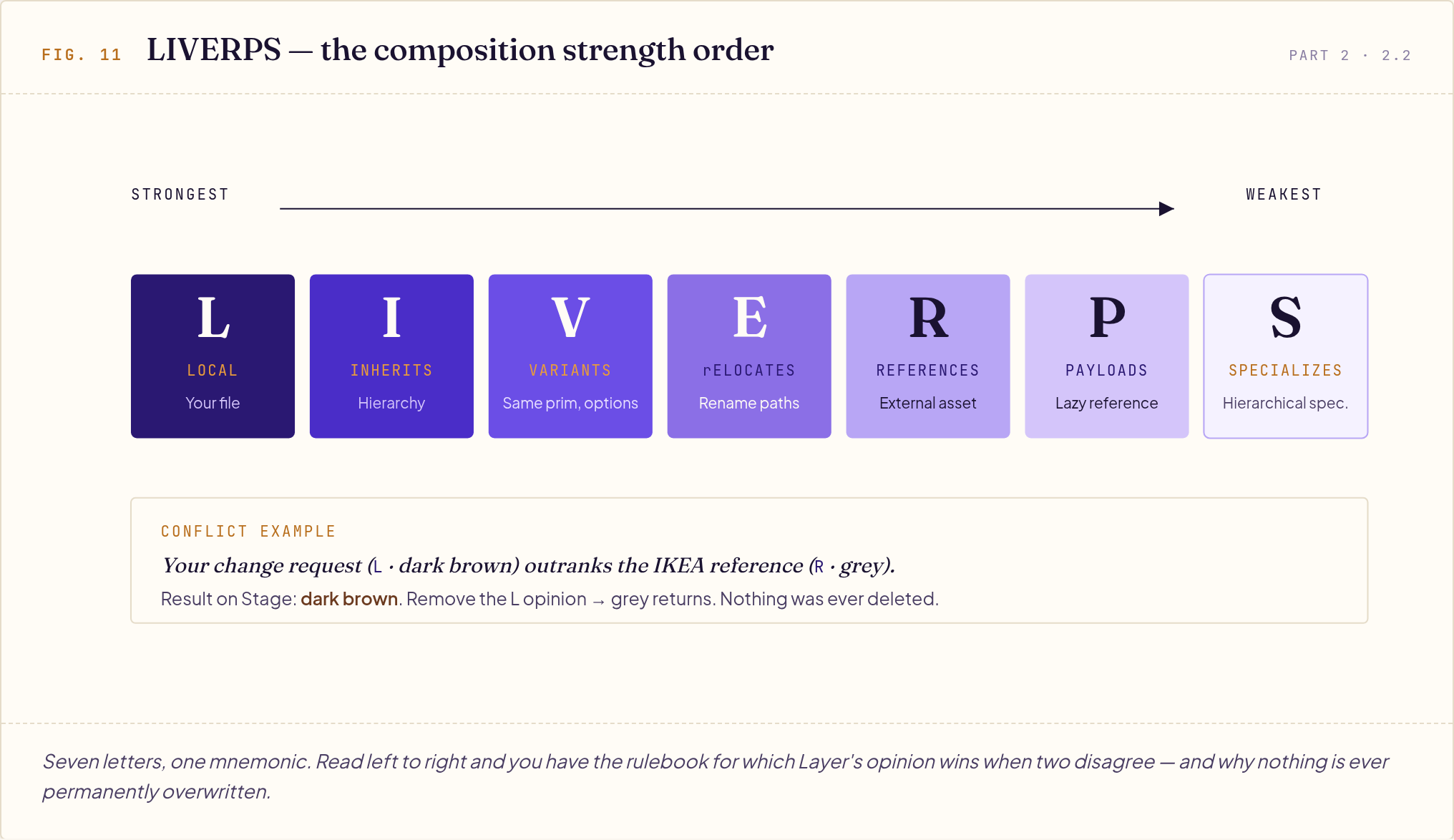
| Letter | Full Name | One-Sentence Use |
|---|---|---|
| L | Local (incl. sublayers) | The blueprint you're currently editing |
| I | Inherits | Hierarchical inheritance |
| V | Variants | Switching between states of the same Prim |
| E | rElocates | Non-destructively renaming a path (newly added) |
| R | References | Reference an external asset |
| P | Payloads | Reference but defer loading |
| S | Specializes | Hierarchical specialization |
Conflict resolution example: Your change request says the sofa is "dark brown" (Local), and IKEA's catalog says "grey" (Reference). Local outranks Reference, so the final sofa is dark brown — but IKEA's grey was never deleted. Remove your change request and grey returns automatically. This is the essence of "non-destructive."
2.3 Hydra: The Render Abstraction Layer
After finishing the renovation floor plan, you need to render it into a 3D perspective to show clients. But each rendering service has its own engine and its own settings.
Hydra inserts an abstraction layer in the middle, decoupling scene description (USD) from any specific renderer. From N × M integration work down to N + M:
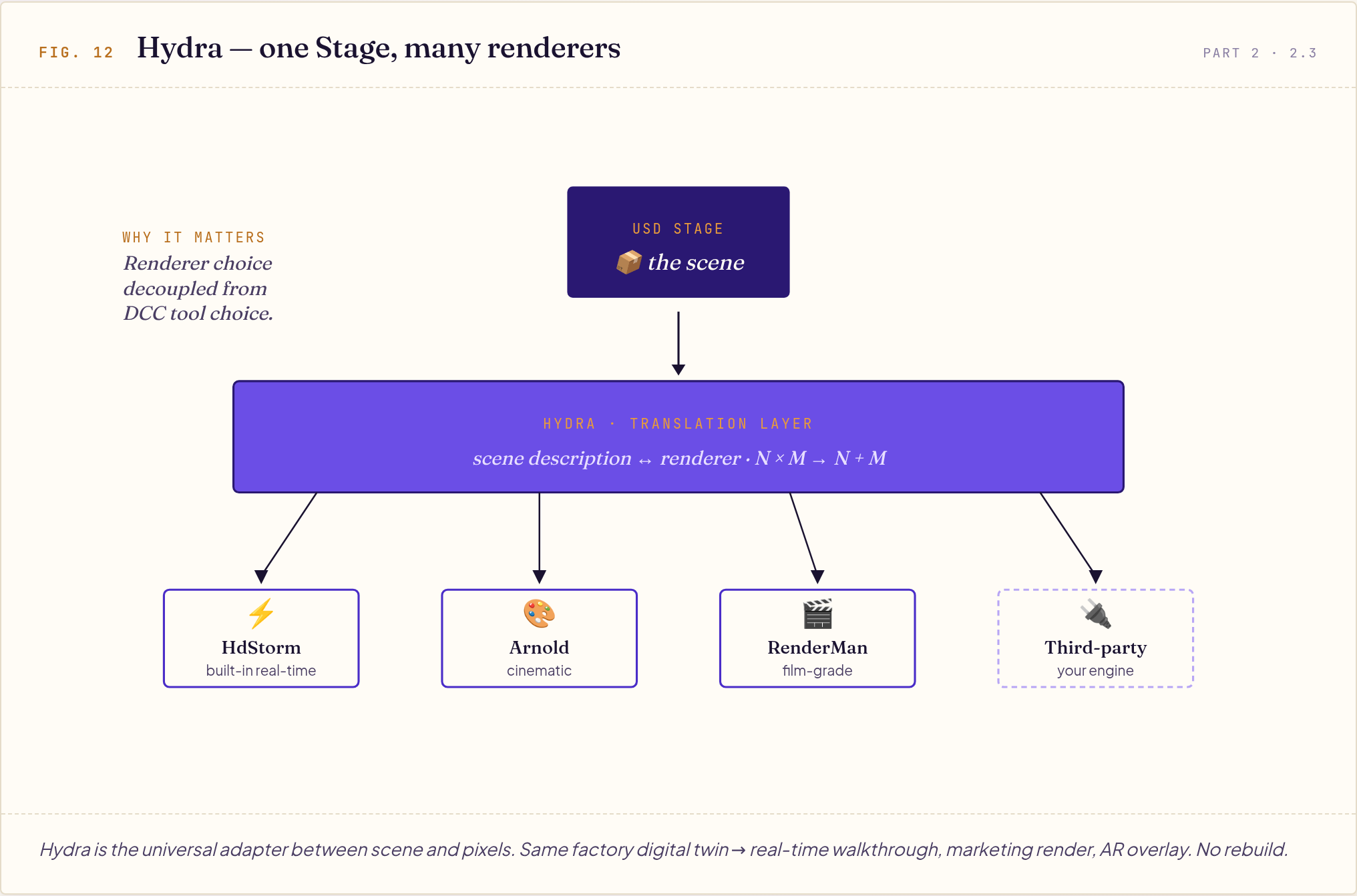
What this means for PMs/Sales: choosing a renderer is no longer locked to a specific DCC tool. The same factory digital twin can be fed to different rendering engines for different purposes — real-time walkthroughs, marketing videos, AR overlays — without redoing the scene.
2.4 Three Industry Cases
🚗 BMW Virtual Factory
BMW built FactoryExplorer on NVIDIA Omniverse + OpenUSD, covering 30+ factories worldwide.
| Validated Outcome | Number |
|---|---|
| Factories covered | 30+ global production sites |
| Planning cost reduction (estimated) | Up to 30% |
| New plant planning time | From 24 months → 12 months |
| Indoor space scanned | 7+ million m² |
| Factory Viewer users | 15,000 employees |
OpenUSD integrates architecture (Revit), equipment (CAD), logistics, vehicles, and workforce simulation into a single USD scene where multiple people simultaneously edit via sublayers. Traditional PLM systems can't do this.
🛒 Lowe's Store Digital Twin
US home improvement retailer Lowe's (2,000+ stores, AOUSD member) uses OpenUSD to integrate AutoCAD, Revit, SketchUp, Maya and live sensor data, building store digital twins usable on Magic Leap 2 AR headsets.
How store associates actually use it:
- AR Reset: Wearing the headset, associates see the digital twin overlaid on the physical shelves, comparing "how it should look vs. current state"
- AR X-Ray Vision: Look up at high shelves and see what's stocked above without climbing a ladder
- Planogram Testing: Before swapping SKU positions, simulate in the digital twin and forecast the sales impact
🥽 Apple Vision Pro / iOS (Consumer AR)
Apple is an AOUSD founding member and chose USDZ as the native format for its AR/spatial computing platform.
Furniture e-commerce scenario: A customer taps a chair on a webpage on an iPhone → AR Quick Look appears → projects a real-size 3D chair into their living room → they put on Vision Pro to view the same webpage and the chair appears in the space in front of them. The entire experience requires no app download — USDZ embeds directly in HTML, just like image or video tags today.
Part 3: Practical Decisions
3.1 How to Choose Among the Three Major Formats?
| Format | Strengths | When to Use |
|---|---|---|
| USD / USDZ | Large scenes, multi-tool collaboration, variants | Industrial digital twins, film production, Apple AR |
| FBX (Autodesk) | Animation, complete skeletons | Game engine import, character animation |
| glTF / GLB (Khronos) | Small file size, fast Web loading | Web 3D, mobile devices, e-commerce display |
Decision tree:
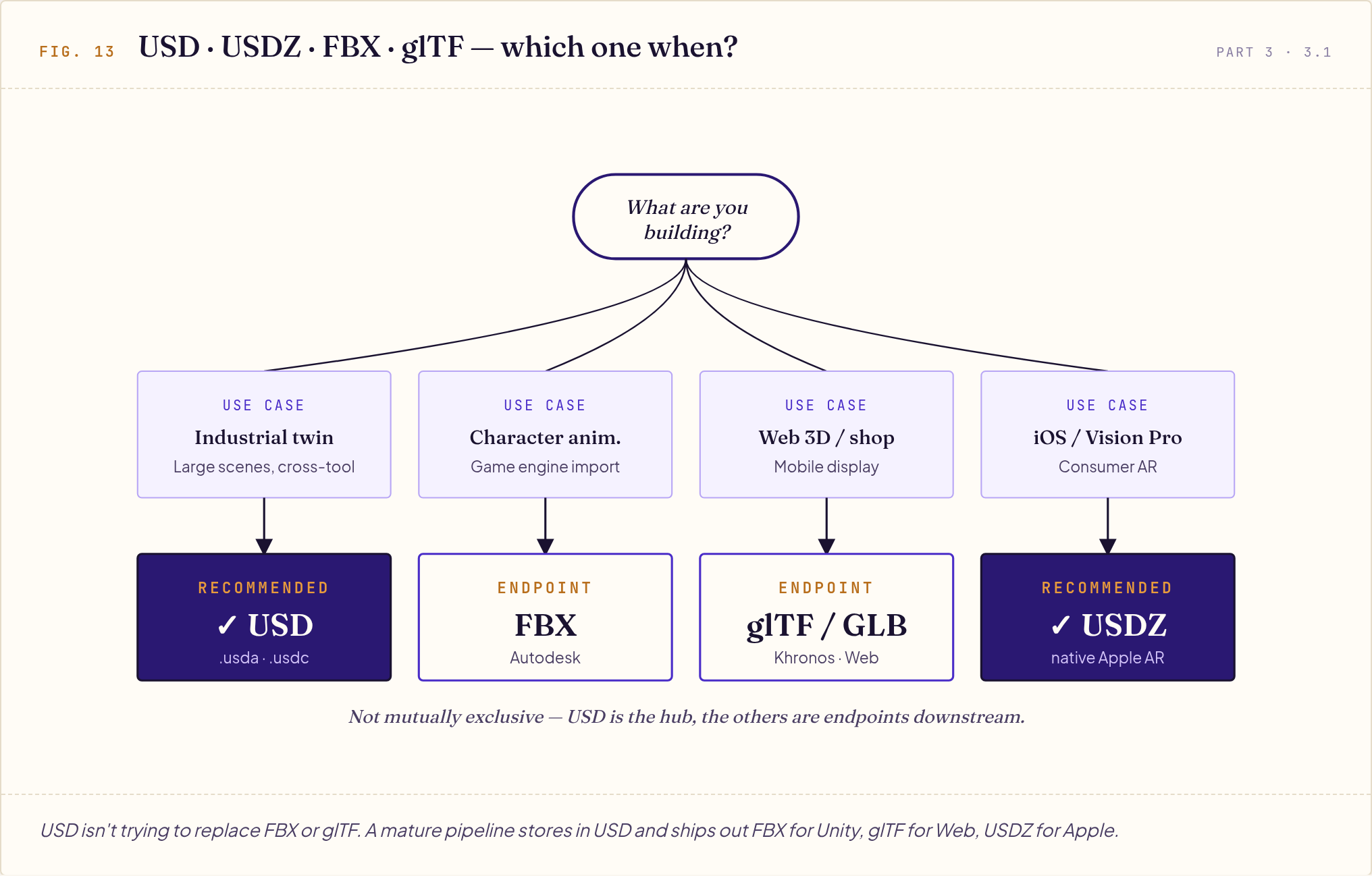
Not mutually exclusive: a mature pipeline typically uses "USD as the central storage format" and converts downstream to glTF (Web), USDZ (Apple), or FBX (Unity). USD is the hub; the others are the endpoints.
Appendix
A. Glossary
| Term | Plain English in 30 Words |
|---|---|
| OpenUSD | Pixar's open-source, cross-tool 3D scene description standard |
| AOUSD | Alliance pushing OpenUSD toward becoming an ISO international standard |
| Stage | The final 3D scene you see (after multiple Layers compose) |
| Layer | A USD file, stackable and overridable |
| Prim | A single object node in the scene |
| Property | An object's attribute (a value or a relationship pointer) |
| Path | An object's "home address" string |
| Composition | Assembling multiple Layers into a Stage |
| LIVERPS | The mnemonic for Composition strength order |
| Reference | Reference an external asset (loaded immediately) |
| Payload | Reference but lazy-loaded |
| Variant Set | Switch between multiple versions of the same object |
| Specifier | def (real) / over (change request) / class (spec) |
| Schema | A Prim's data spec |
| Hydra | OpenUSD's render abstraction layer |
| USDZ | A packaged USD bundle, native to iOS / Vision Pro |
B. Further Reading
- Official: openusd.org | aousd.org
- Tutorials: NVIDIA Learn OpenUSD
- Practical: USD Survival Guide
- Case studies: BMW × Omniverse | Lowe's Innovation Labs
C. Sources
This guide draws on the following sources (current as of May 2026): Pixar OpenUSD official documentation and Quickstart Guide, AOUSD website and announcements, NVIDIA Learn OpenUSD, BMW Group official press releases, Lowe's official press releases, Apple Developer documentation, and the Wikipedia AOUSD entry.
This guide is an OpenUSD primer, aimed at establishing a shared vocabulary. Practical decisions — format choice, adoption evaluation, enterprise rollout timeline — are advanced topics that deserve a separate write-up.